Welcome to the VIU Classroom Technology Guide, your one stop reference for all things related to Classroom Technology. This page includes step by step manuals for each classroom, quick set up information, troubleshooting tips, best practices, training session availability and more!
Click Add to Favorites on the right hand side, or bookmark this page for future reference!
Quick Set Up (General)
How do I login to an instructor station?
Log in to the instructor station using your VIU username and password.
Note: If you are a guest on campus, please contact your VIU facilitator for the correct log on credentials.
How do I connect my own laptop to the projector?
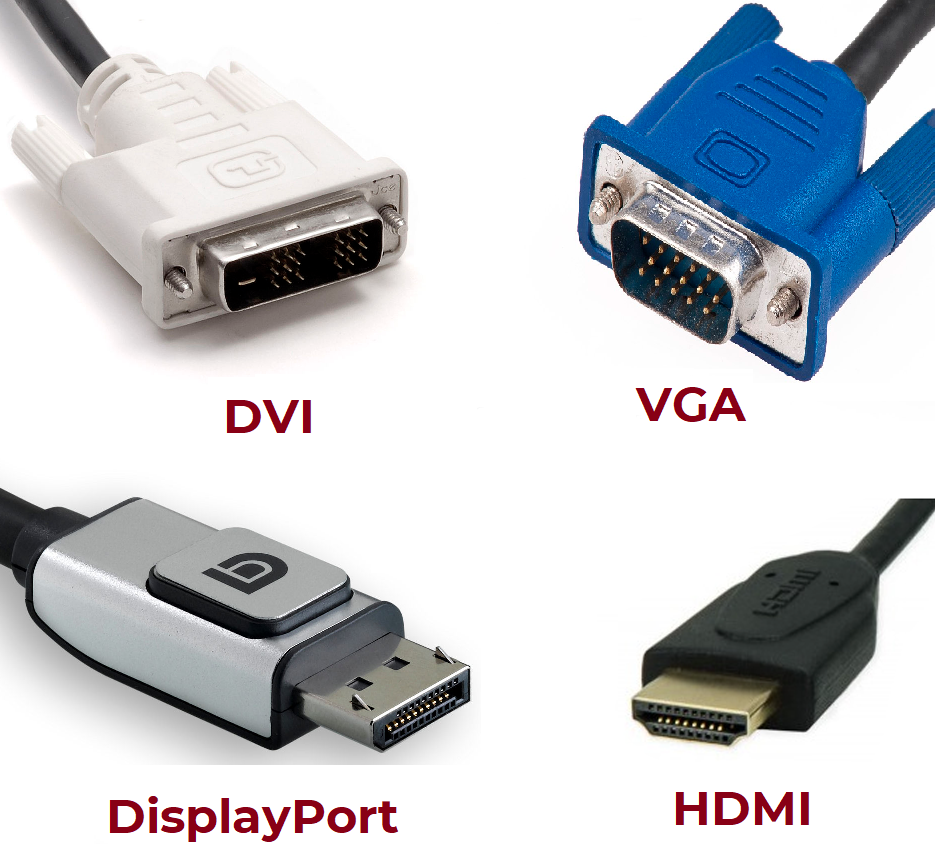
Step 1: Identify what adapter the projector uses
Projectors may use a variety of different display cables including DVI, VGA, DisplayPort, and HDMI:
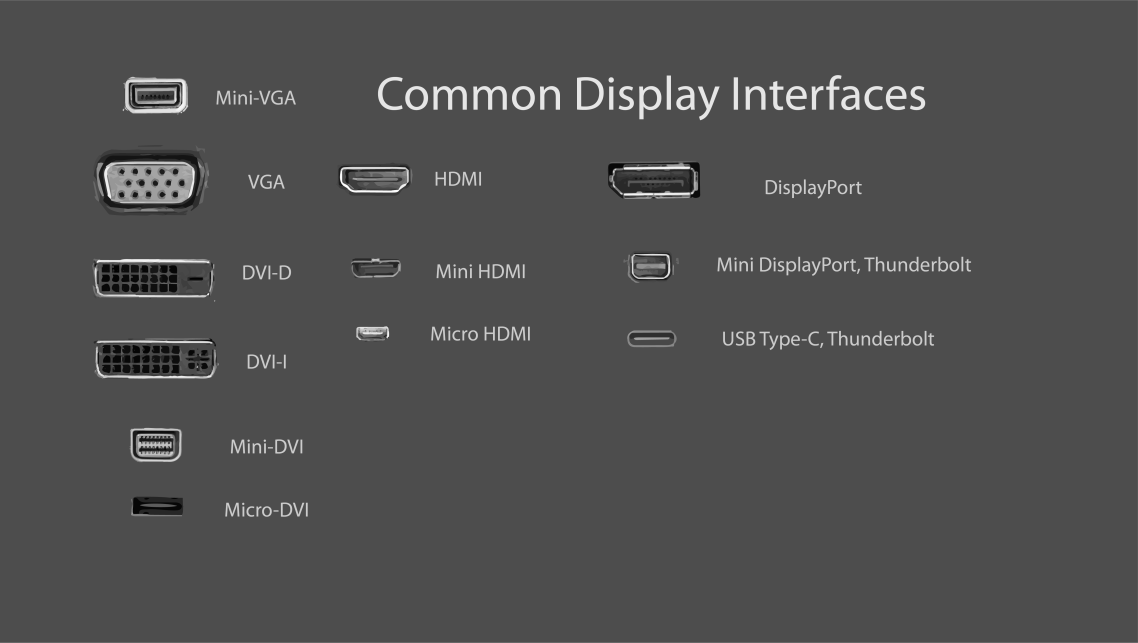
Step 2: Identify what ports your laptop has
Your laptop may have different ports and may require an adapter:
Step 3: Obtain an adapter (if you need one)
If your laptop does not have the correct port, you will likely need an adapter. Contact your area administrator for help ordering an adapter. If you need a recommendation on what adapter to purchase, please Contact IT Services.
Step 4: Connect your laptop
Connect the projector's display cable to your laptop, using the appropriate adapter if necessary
Classroom Specific Instructions
This section contains a list of rooms equipped with classroom technology. Each room links to a step by step manual for using the instructor stations. Click on the relevant campus location, then building number to view lists of the rooms, summaries of the equipment available, and technology guides that can be downloaded in an Adobe PDF format.
Nanaimo
B108
| Room |
Description and Equipment |
Guide |
| 105 |
Windsor Space. Can be combined with R110 or partitioned. Two projectors are available when combined, and one when partitioned. The projectors can be used with the existing PC, or a device connected by HDMI. |
Download PDF |
| 110 |
Can be combined with R105 or partitioned. The projector can be used with a device connected by HDMI. |
Download PDF |
| 120 |
The projector can be used with the existing PC or a device connected by HDMI. There is also a document camera. |
Download PDF |
| 125 |
The projector can be used with the existing PC or a device connected by HDMI. There is also a document camera. |
Download PDF |
| 130 |
The projector can be used with the existing PC or a device connected by HDMI. There is also a document camera. |
Download PDF |
B115
| Room |
Description and Equipment |
Guide |
| 210 |
The projector can be used with the existing PC, or a device connected by VGA. |
Download PDF |
B150
| Room |
Description and Equipment |
Guide |
| 205 |
The projector and TV can be used with the existing PC, or a device connected by HDMI or VGA. There is also a document camera. |
Download PDF |
| 210 |
The projector and TV can be used with the existing PC, or a device connected by HDMI or VGA. There is also a document camera. |
Download PDF |
B164
| Room |
Description and Equipment |
Guide |
| 110 |
The projector is operated by remote control and can be used with a device connected by HDMI or DVI. |
Download PDF |
| 118 |
The projector is operated by remote control and can be used with the existing PC, or a device connected by HDMI or VGA. |
Download PDF |
| 122 |
The projector can be used with the existing PC, or a device connected by VGA. There is also a document camera. |
Download PDF |
B165
| Room |
Description and Equipment |
Guide |
| 101 |
The projector can be used with the existing PC, or a device connected by HDMI. |
Download PDF |
| 108 |
The projector can be used with the existing PC, or a device connected by VGA. |
Download PDF |
| 109 |
The projector can be used with the existing PC, or a device connected by HDMI, VGA, or wirelessly with Via Go. There is also a document camera and videoconferencing equipment. |
Download PDF |
B180
| Room |
Description and Equipment |
Guide |
| 134 |
Lecture theatre. The projector can be used with the existing PC, or a device connected by HDMI or VGA, or wirelessly with Via Go. There is also a document camera and videoconferencing equipment. |
Download PDF |
| 138 |
The display can be used with a device connected by HDMI or VGA. |
Download PDF |
| 147 |
The projector can be used with the existing PC, or a device connected by HDMI or VGA, or wirelessly with Via Go. There is also a document camera. |
Download PDF |
| 148 |
The projector can be used with the existing PC, or a device connected by HDMI or VGA, or wirelessly with Via Go. There is also a document camera. |
Download PDF |
| 152 |
ElderCollege. The projector can be used with the existing PC, or a device connected by HDMI or VGA. |
Download PDF |
| 236 |
|
Download PDF |
| 238 |
The projector can be used with the existing PC, or a device connected by VGA. There is also a Smartboard. |
Download PDF |
| 244 |
The projector can be used with the existing PC, or a device connected by VGA. |
Download PDF |
| 246 |
The projector can be used with the existing PC, or a device connected by VGA. There is also a document camera. |
Download PDF |
| 248 |
The projector can be used with the existing PC, or a device connected by HDMI or VGA. This rooms also contains video conferencing equipment for meetings. |
Download PDF |
| 250 |
The projector can be used with the existing PC, or a device connected by VGA. There is also a document camera. |
Download PDF |
| 252 |
The projector can be used with the existing PC, or a device connected by HDMI, VGA, or wirelessly with Via Go. There is also a document camera and videoconferencing equipment. |
Download PDF |
| 254 |
The projector can be used with the existing PC, or a device connected by HDMI, VGA, or wirelessly with Via Go. There is also a document camera and videoconferencing equipment. |
Download PDF |
| 256 |
The projector can be used with the existing PC. |
Download PDF |
| 258 |
The projector can be used with the existing PC, or a device connected by HDMI, VGA, or wirelessly with Via Go. There is also a document camera and videoconferencing equipment. |
Download PDF |
| 310 |
The projector can be used with the existing PC, or a device connected by VGA. |
Download PDF |
| 316 |
The TV screens can be used with the existing PC (three monitor), or a device connected by HDMI or VGA. There is also a document camera. |
Download PDF |
| 332 |
The projector can be used with the existing PC, or a device connected by VGA. |
Download PDF |
| 333 |
The projector can be used with the existing PC. |
Download PDF |
| 334 |
The projector can be used with the existing PC, or a device connected by VGA. There is also a document camera. |
Download PDF |
| 340 |
The projector can be used with the existing PC, or a device connected by VGA. There is also a Smartboard. |
Download PDF |
| 412 |
The projector can be used with the existing PC, or a device connected by HDMI, VGA, or wirelessly with Via Go. There is also a document camera and videoconferencing equipment. |
Download PDF |
| 416 |
The projector can be used with the existing PC, or a device connected by HDMI, VGA, or wirelessly with Via Go. There is also a document camera and videoconferencing equipment. |
Download PDF |
| 452 |
The projector can be used with the existing PC, or a device connected by VGA. |
Download PDF |
| 454 |
The projector can be used with the existing PC, a device connected by HDMI or VGA, or VIA GO wireless collaboration. There is also a document camera. |
Download PDF |
| 542 |
The projector can be used with the existing PC, or a device connected by VGA. |
Download PDF |
| 550 |
The projector can be used with the existing PC, or a device connected by HDMI, VGA, or wirelessly with Via Go. There is also a document camera and videoconferencing equipment. |
Download PDF |
| 552 |
The projector can be used with the existing PC, a device connected by HDMI or VGA, or VIA GO wireless collaboration. There is also a document camera. |
Download PDF |
B200
| Room |
Description and Equipment |
Guide |
| 105 |
The projector can be used with the existing PC, or a device connected by HDMI or VGA, or wirelessly with Via Go. There is also a document camera. |
Download PDF |
| 106 |
The projector can be used with the existing PC, or a device connected by HDMI or VGA, or wirelessly with Via Go. There is also a document camera. |
Download PDF |
| 203 |
Lecture theatre. The projector can be used with the existing PC, or a device connected by HDMI or VGA. There is also a document camera. |
Download PDF |
| 237 |
The projector can be used with the existing PC, or a device connected by VGA. |
Download PDF |
| 238 |
The projector can be used with the existing PC, or a device connected by VGA. |
Download PDF |
B205
| Room |
Description and Equipment |
Guide |
| 101 |
The projector can be used with the existing PC, or a device connected by VGA. |
Download PDF |
| 102 |
The projector can be used with the existing PC, or a device connected by HDMI, VGA, or wirelessly with Via Go. There is also a document camera and videoconferencing equipment. |
Download PDF |
| 103 |
The projector can be used with the existing PC, or a device connected by VGA. |
Download PDF |
| 104 |
The projector can be used with the existing PC, or a device connected by VGA. |
Download PDF |
| 105 |
The projector can be used with the existing PC, or a device connected by VGA. |
Download PDF |
| 106 |
The projector can be used with the existing PC, or a device connected by HDMI or VGA. There is also a document camera. |
Download PDF |
| 201 |
The projector can be used with the existing PC, or a device connected by HDMI or VGA. There is also a document camera. |
Download PDF |
| 202 |
The projector can be used with the existing PC, or a device connected by HDMI, VGA, or wirelessly with Via Go. There is also a document camera and videoconferencing equipment. |
Download PDF |
| 203 |
The projector can be used with the existing PC, or a device connected by VGA. |
Download PDF |
| 204 |
The projector can be used with the existing PC, or the document scanner. |
Download PDF |
| 205 |
The projector can be used with the existing PC, or the document scanner. |
Download PDF |
| 206 |
The projector can be used with the existing PC. |
Download PDF |
| 211 |
The projector can be used with the existing PC, or a device connected by HDMI or VGA. There is also a document camera. |
Download PDF |
B210
| Room |
Description and Equipment |
Guide |
| 105 |
The projectors can be used with the existing PC, a device connected by HDMI, or with Via Go wireless. This room also contains video conferencing equipment for meetings and a document camera. |
Download PDF |
| 110 |
The projectors can be used with the existing PC, a device connected by HDMI, or with Via Go wireless. This room also contains a document camera. |
Download PDF |
| 205 |
Meeting room. The projector can be used with the existing PC, a device connected by HDMI, or with Via Go wireless. This room also contains video conferencing equipment for meetings. |
Download PDF |
| 220 |
Meeting room. The TV can be used with the existing PC, a device connected by HDMI, or with Via Go wireless. This room also contains video conferencing equipment for meetings. |
Download PDF |
| 225 |
The projector can be used with the existing PC, or a device connected by HDMI. This room also contains a document camera. |
Download PDF |
| 230 |
The TV can be used with the existing PC, a device connected by HDMI, or with Via Go wireless. This room also contains video conferencing equipment for meetings. |
Download PDF |
| 240 |
The projector can be used with the existing PC, or a device connected by HDMI. This room also contains a document camera. |
Download PDF |
| 245 |
The projector can be used with the existing PC, or a device connected by HDMI. This room also contains a document camera. |
Download PDF |
| 250 |
The projector can be used with the existing PC, or a device connected by HDMI. This room also contains a document camera. |
Download PDF |
| 255 |
The projector can be used with the existing PC, or a device connected by HDMI. This room also contains a document camera. |
Download PDF |
| 260 |
The projector can be used with the existing PC, or a device connected by HDMI. This room also contains video conferencing equipment for meetings, and a document camera. |
Download PDF |
| 270 |
The projector can be used with the existing PC, or a device connected by HDMI. This room also contains video conferencing equipment for meetings, and a document camera. |
Download PDF |
| 275 |
The projectors can be used with the existing PC, a device connected by HDMI, or with Via Go wireless. This rooms also contains a document camera. |
Download PDF |
| 360 |
The projector can be used with the existing PC, or a device connected by HDMI. This room also contains video conferencing equipment for meetings, and a document camera. |
Download PDF |
| 380 |
The projector can be used with the existing PC, or a device connected by HDMI. This room also contains video conferencing equipment for meetings, and a document camera. |
Download PDF |
| 385 |
The projectors can be used with the existing PC, or a device connected by HDMI. This room also contains a document camera. |
Download PDF |
| 390 |
Meeting room. The TV can be used with the existing PC, a device connected by HDMI, or with Via Go wireless. This rooms also contains video conferencing equipment for meetings. |
Download PDF |
| 460 |
The projector can be used with the existing PC, a device connected by HDMI. This room also contains a document camera. |
Download PDF |
| 470 |
The projector can be used with the existing PC, a device connected by HDMI. This room also contains a document camera. |
Download PDF |
| 475 |
The projector can be used with the existing PC, a device connected by HDMI. This room also contains a document camera. |
Download PDF |
| 484 |
The projector can be used with the existing PC, a device connected by HDMI. This room also contains a document camera. |
Download PDF |
B250
| Room |
Description and Equipment |
Guide |
| 110 |
The projector can be used with the existing PC, or a device connected by VGA. |
Download PDF |
| 115 |
The projectors can be used with the existing PC, or a device connected by HDMI, VGA, or Via Go wireless. This room also contains video conferencing equipment for meetings. |
Download PDF |
| 120 |
The projector can be used with the existing PC, or a device connected by VGA. |
Download PDF |
| 125 |
Lecture theatre. The projectors can be used with the existing PC, or a device connected by HDMI or VGA. There is also a document camera. |
Download PDF |
| 140 |
The projectors can be used with the existing PC, or a device connected by HDMI or Via Go wireless. This room also contains video conferencing equipment for meetings. |
Download PDF |
| 205 |
The projectors can be used with the existing PC, or a device connected by HDMI, VGA, or wirelessly with Via Go. There is also a document camera and videoconferencing equipment. |
Download PDF |
| 210 |
The projectors can be used with the existing PC, or a device connected by HDMI, VGA, or wirelessly with Via Go. There is also a document camera and videoconferencing equipment. |
Download PDF |
| 215 |
The projector can be used with the existing PC, or a device connected by VGA. |
Download PDF |
| 220 |
The projectors can be used with the existing PC, or a device connected by HDMI, VGA, or Via Go wireless. This room also contains video conferencing equipment for meetings and a document camera. |
Download PDF |
| 308 |
Conference room. The projector can be used with the existing PC, or a device connected by HDMI, VGA, or Via Go wireless. |
Download PDF |
B255
| Room |
Description and Equipment |
Guide |
| 105 |
The projector can be used with the existing PC, or a device connected by VGA. |
Download PDF |
| 120 |
The projector can be used with the existing PC, or a device connected by VGA. |
Download PDF |
| 125 |
The projector can be used with the existing PC, or a device connected by VGA. |
Download PDF |
| 130 |
The projector can be used with the existing PC, or a device connected by VGA. |
Download PDF |
| 135 |
The projector can be used with the existing PC, or a device connected by VGA. |
Download PDF |
| 140 |
The projector can be used with the existing PC, or a device connected by VGA. |
Download PDF |
| 145 |
The projector can be used with the existing PC, or a device connected by VGA. |
Download PDF |
| 150 |
The projector can be used with the existing PC, or a device connected by VGA. |
Download PDF |
| 155 |
The projector can be used with the existing PC, or a device connected by VGA. |
Download PDF |
| 160 |
The projector can be used with the existing PC, or a device connected by HDMI, VGA, or wirelessly with Via Go. There is also a document camera and videoconferencing equipment. |
Download PDF |
| 165 |
The projector can be used with the existing PC, or a device connected by HDMI, VGA, or wirelessly with Via Go. There is also a document camera and videoconferencing equipment. |
Download PDF |
| 170 A/B |
Dividable room. The projectors can be used with the existing PC, or a device connected by HDMI or VGA. |
Download PDF |
| 175 |
The projector can be used with the existing PC, or a device connected by HDMI or VGA. This room also contains video conferencing equipment for meetings. |
|
| 205 |
Conference room. The projector can be used with the existing PC, or a device connected by HDMI or VGA. |
|
| 248 |
Meeting room. The projector can be used with the existing PC, or a device connected by HDMI or VGA. This room also contains video conferencing equipment for meetings. |
|
B300
| Room |
Description and Equipment |
Guide |
| 128 |
The projector can be used with the existing PC, a device connected by HDMI, VGA, or Via Go wireless. This room also contains a document camera. |
Download PDF |
| 134 |
The projector can be used with the existing PC, a device connected by HDMI, VGA, or Via Go wireless. This room also contains a document camera. |
Download PDF |
| 156 |
TThe projector can be used with the existing PC, or a device connected by HDMI. |
Download PDF |
| 401 |
Royal Arbutus Room. The projector can be used with the existing PC, a device connected by HDMI, VGA, or Via Go wireless. |
Download PDF |
B305
| Room |
Description and Equipment |
Guide |
| 274 |
This room type contains two TV’s, a PC, and HDMI connections for laptops and other devices, and a PTZ camera and microphone. |
Download PDF |
| 431a |
This room type contains a TV, a PC with wireless keyboard and mouse, an HDMI connection, a Wireless Collaboration Device and a USB Camera/Microphone.
|
Download PDF |
| 507 |
This room contains one projector and a TV, a built-in PC, HDMI connection for personal devices, Via Go wireless collaboration and video conferencing equipment. The equipment is controlled by a touch panel interface at the instructor station.
|
Download PDF |
| 508 |
This room contains two projectors, a built-in PC, HDMI connection, document camera, clip-on microphone, and wireless collaboration. |
Download PDF |
| 509 |
This room type contains 2 TVs, a PC with wireless keyboard and mouse, and a Camera/Microphone/Speaker – mounted under the TVs.
|
Download PDF |
B315
| Room |
Description and Equipment |
Guide |
| 102 |
The projector can be used with the existing PC, a device connected by HDMI, VGA, or Via Go wireless. This room also contains a document camera. |
Download PDF |
| 108 |
The projector can be used with the existing PC, a device connected by HDMI or VGA. This room also contains a document camera. |
Download PDF |
| 112 |
The projector can be used with the existing PC, a device connected by HDMI, VGA. This room also contains a document camera and Smartboard. |
Download PDF |
| 113 |
The projector can be used with the existing PC, or a device connected by HDMI, VGA, or wirelessly with Via Go. There is also a document camera and videoconferencing equipment. |
Download PDF |
| 114 |
The projector can be used with the existing PC, or a device connected by VGA. |
Download PDF |
| 115 |
The projectors can be used with the existing PC, a device connected by HDMI, VGA, or Via Go wireless. This room also contains video conferencing equipment for meetings and a document camera. |
Download PDF |
| 240 |
The projector can be used with the existing PC, a device connected by HDMI or VGA. This room also contains a document camera. |
Download PDF |
B320
| Room |
Description and Equipment |
Guide |
| 105 |
Lecture theatre. |
|
| 107 |
The projector can be used with the existing PC, a device connected by HDMI, VGA, or Via Go wireless. This room also contains video conferencing equipment for meetings and a document camera. |
Download PDF |
| 204 |
The projector can be used with the existing PC, a device connected by HDMI or VGA. |
Download PDF |
| 205 |
The projector can be used with the existing PC, a device connected by HDMI or VGA. |
Download PDF |
| 201 |
The projector can be used with a device connected by HDMI or VGA. |
Download PDF |
B325
| Room |
Description and Equipment |
Guide |
| 110 |
The projector can be used with the existing PC, or a device connected by HDMI or VGA. There is also a document camera. |
Download PDF |
| 204 |
The projector can be used with the existing PC, or a device connected by VGA. There is also a Smartboard. |
Download PDF |
| 207 |
The projector can be used with the existing Mac, or a device connected by HDMI or VGA. |
Download PDF |
| 210 |
|
|
| 211 |
The projector can be used with the existing PC, or a device connected by HDMI or VGA. |
Download PDF |
B345
| Room |
Description and Equipment |
Guide |
| 102 |
|
|
| 103 |
The projector can be used with the existing PC, or a device connected by HDMI or VGA. There is also a document camera. |
Download PDF |
| 104 |
|
|
| 105 |
The projector can be used with the existing PC, or a device connected by HDMI or VGA. There is also a document camera. |
Download PDF |
| 106 |
The projector can be used with the existing PC, or a device connected by HDMI or VGA. There is also a document camera. |
Download PDF |
| 108 |
The two projectors can be used with the existing PC, or a device connected by HDMI or VGA. There is also Apple TV functionality, a Blue-ray player, and a document camera. |
|
| 207 |
|
|
| 208 |
The projector can be used with the existing PC, or a device connected by HDMI or VGA. There is also a document camera. |
Download PDF |
| 209 |
The projector can be used with the existing PC, or a device connected by HDMI or VGA. There is also a document camera. |
Download PDF |
| 211 |
The projector can be used with the existing PC, or a device connected by HDMI or VGA. There is also a document camera. |
Download PDF |
| 213 |
The projector can be used with the existing PC, a device connected by HDMI or VGA, or VIA GO wireless collaboration. There is also a document camera. |
Download PDF |
| 214 |
Meeting room. |
|
B355
| Room |
Description and Equipment |
Guide |
| 102 |
The projector can be used with the existing PC, or a device connected by HDMI or VGA. |
Download PDF |
| 103 |
The projector can be used with the existing PC, or a device connected by VGA. There is also a Smartboard. |
Download PDF |
| 107 |
The projector can be used with the existing PC, or a device connected by VGA. |
Download PDF |
| 108 |
The projector can be used with the existing PC, or a device connected by HDMI or VGA. There is also a document camera. |
Download PDF |
| 203 |
Lecture theatre. The projector can be used with the existing PC, or a device connected by HDMI or VGA. There is also a document camera and video conferencing equipment. |
Download PDF |
B356
| Room |
Description and Technology |
Guide |
| 109 |
Lecture theatre. The projector can be used with the existing PC, or a device connected by HDMI or VGA. There is also a document camera. |
Download PDF |
| 111 |
The projector can be used with the existing PC, or a device connected by VGA. |
Download PDF |
| 209 |
The projector can be used with the existing PC, or a device connected by VGA. |
Download PDF |
| 213 |
The projector can be used with the existing PC, or a device connected by VGA. There is also a Smartboard. |
Download PDF |
| 215 |
The projectors can be used with the existing PC, or a device connected by HDMI or VGA, or wirelessly with Apple TV. There is also a document camera and video conferencing equipment. |
Download PDF |
| 217 |
The projector can be used with the existing PC, or a device connected by HDMI or VGA, or wirelessly with Via Go. There is also a document camera. |
Download PDF |
| 219 |
The projectors can be used with the existing PC, or a device connected by HDMI or VGA, or wirelessly with Apple TV. There is also a document camera. |
Download PDF |
| 236 |
The projectors can be used with the existing PC, or a device connected by HDMI or VGA, or wirelessly with Apple TV. There is also a document camera and video conferencing equipment. |
Download PDF |
| 240 |
The projectors can be used with the existing PC, or a device connected by HDMI or VGA, or wirelessly with Apple TV. There is also a document camera. |
Download PDF |
| 244 |
The projector can be used with the existing PC, or a device connected by HDMI or VGA, or wirelessly with Apple TV. There is also a document camera. |
Download PDF |
| 276 |
Meeting room. The projector can be used with the existing PC, or a device connected by HDMI or VGA. |
Download PDF |
| 313 |
The projector can be used with the existing PC, or a device connected by VGA. |
Download PDF |
| 315 |
The projector can be used with the existing PC, or a device connected by HDMI, VGA, or wirelessly with Via Go. There is also a document camera and videoconferencing equipment. |
Download PDF |
| 317 |
The projector can be used with the existing PC, or a device connected by VGA. |
Download PDF |
| 319 |
The projector can be used with the existing PC, or a device connected by HDMI, VGA, or wirelessly with Via Go. There is also a document camera and videoconferencing equipment. |
Download PDF |
| 325 |
The projector can be used with the existing PC, or a device connected by VGA. |
Download PDF |
| 334 |
The projector can be used with the existing PC, or a device connected by HDMI or VGA, or wirelessly with Via Go. There is also a document camera. |
Download PDF |
| 336 |
The projector can be used with the existing PC, or a device connected by HDMI, VGA, or wirelessly with Via Go. There is also a document camera and videoconferencing equipment. |
Download PDF |
B460
| Room |
Description and Equipment |
Guide |
| 201 |
The projector can be used with the existing PC, or a device connected by HDMI or VGA. |
Download PDF |
| 205 |
The projector can be used with the existing PC, or a device connected by HDMI or VGA. |
Download PDF |
| 323 |
The projector can be used with the existing PC, or a device connected by VGA. |
Download PDF |
| 324 |
The projector can be used with the existing PC, or a device connected by VGA. |
Download PDF |
B465
| Room |
Description and Equipment |
Guide |
| 100 |
Log cabin. The projector can be used with the existing PC, or a device connected by HDMI or VGA. |
Download PDF |
B470
| Room |
Description and Equipment |
Guide |
| 105 |
The projector can be used with the existing PC, a device connected by HDMI or VGA, or with Via Go wireless. This rooms also contains a document camera. |
Download PDF |
| 106 |
The projector can be used with the existing PC, a device connected by HDMI or VGA, or with Via Go wireless. This rooms also contains a document camera. |
Download PDF |
| 107 |
The projector can be used with the existing PC, a device connected by HDMI or VGA, or with Via Go wireless. This rooms also contains a document camera. |
Download PDF |
| 111 |
The projectors can be used with the existing PC, or a device connected by HDMI or VGA. |
Download PDF |
| 204 |
The projector can be used with the existing PC. The room also contains a document camera. |
Download PDF |
| 217 |
The projectors can be used with the existing PC, or a device connected by VGA. The room also contains a document camera. |
Download PDF |
| 241 |
The projectors can be used with the existing PC, or a device connected by VGA. The room also contains a Smartboard. |
Download PDF |
| 243 |
The projector can be used with the existing PC, or a device connected by HDMI, VGA, or wirelessly with Via Go. There is also a document camera and videoconferencing equipment. |
Download PDF |
B480
| Room |
Description and Equipment |
Guide |
| 201 |
The projector can be used with the existing PC, a device connected by HDMI or VGA, or with Via Go wireless. This rooms also contains video conferencing equipment for meetings and a document camera. |
Download PDF |
| 202 |
The projector can be used with the existing PC, a device connected by HDMI or VGA, or with Via Go wireless. This rooms also contains video conferencing equipment for meetings and a document camera. |
Download PDF |
Cowichan
| Room |
Description and Equipment |
Guide |
| 700-125 |
The projector can be used with the existing PC, or a device connected by HDMI, VGA, or wirelessly with Via Go. There is also a document camera and videoconferencing equipment. |
Download PDF |
| 700-215 |
The projector can be used with the existing PC, or a device connected by HDMI, VGA, or wirelessly with Via Go. There is also a document camera and videoconferencing equipment. |
Download PDF |
| 700-220 |
The projector can be used with the existing PC, or a device connected by HDMI, VGA, or wirelessly with Via Go. There is also a document camera and videoconferencing equipment. |
Download PDF |
| 700-225 |
The projector can be used with the existing PC, or a device connected by HDMI, VGA, or wirelessly with Via Go. There is also a document camera and videoconferencing equipment. |
Download PDF |
| 700-260 |
The projector can be used with the existing PC, or a device connected by HDMI, VGA, or wirelessly with Via Go. There is also a document camera and videoconferencing equipment. |
Download PDF |
tiwšɛmawtxw Campus
| Room |
Description and Equipment |
Guide |
| 610-135 |
The projector can be used with the existing PC, or a device connected by HDMI, VGA, or wirelessly with Via Go. There is also a document camera and videoconferencing equipment. |
Download PDF |
| 610-148 |
The projector can be used with the existing PC, or a device connected by HDMI, VGA, or wirelessly with Via Go. There is also a document camera and videoconferencing equipment. |
Download PDF |
| 610-152 |
The projector can be used with the existing PC, or a device connected by HDMI, VGA, or wirelessly with Via Go. There is also a document camera and videoconferencing equipment. |
Download PDF |
Quick Troubleshooting
How do I adjust the volume?
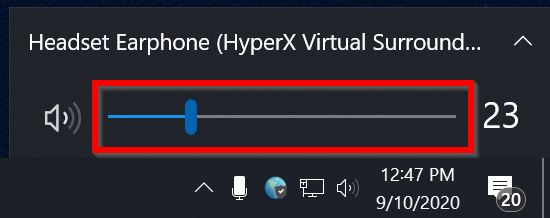
Click on the volume icon on the lower-right of your screen by the clock. Adjust the volume slider.
Why can't I hear any audio?
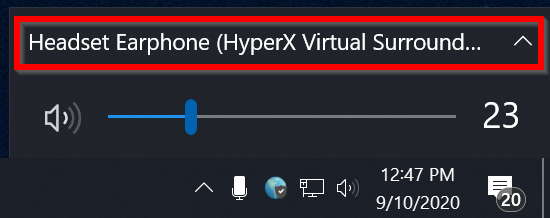
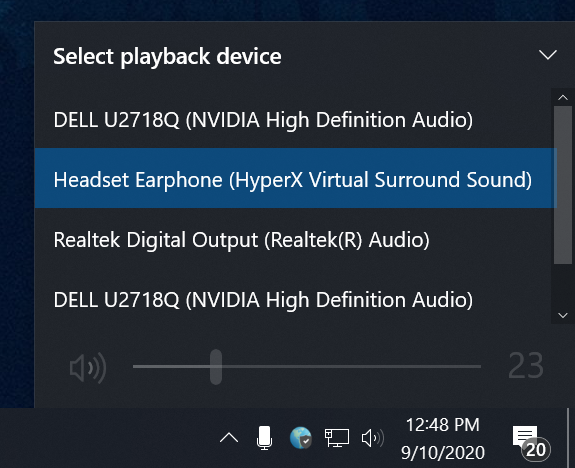
You may need to change your audio output device:
-
Click on the volume icon on the lower-right of the screen by the clock. Click on the current audio device.
-
Select the correct audio output device from the list
-
Set the volume to an appropriate level and test the audio
How do I troubleshoot projector issues?
-
Make sure the projector is turned on and the projector's display cable is connected to your laptop.
-
You may need to change your laptop's display preferences. Hold down the Windows key ⊞ on your keyboard and press P, then select Duplicate or Extend
-
If you still need assistance, Contact IT Services or create a ticket
Computer Lab FAQ
Where are computer labs located?
Nanaimo Campus
All labs, except for those marked with an asterisk (*), can be booked.
- Bldg 205 - 1st Floor Open Area*
- Bldg 250 - Room 115 (includes SPSS & Sage 50) - 36 workstations + 1 Instructor station
- Bldg 250 - 2nd Floor Open Area* (includes Sage 50 - 12 workstations
- Bldg 255 Room 105 - 22 workstations + 1 Instructor station
- Bldg 255 Room 120 - 22 workstations + 1 Instructor station
- Bldg 255 - 1st Floor Open Area* - 32 workstations
- Bldg 305 (Library), Library Commons* (includes SPSS, NVivo and ArcGIS)
- Bldg 305 Room 508* (available during library open hours when not being used for library instruction)
- Bldg 315 Room 113 (includes GIS software) - 24 workstations + 1 Instructor station
- Bldg 356 Room 340 (includes SPSS) - 20 workstations + 1 Instructor station
- Bldg 356 - 2nd Floor Atrium* (includes SPSS) - 19 workstations
Cowichan Campus
- The Cowichan Info commons area is available for general computer use.
tiwšɛmawtxwCampus
Where are specialty labs located?
The following specialty classrooms are restricted to students in specific programs:
- Bldg 356 Room 221 Education multimedia computer lab
- Bldg 355 Room 110 Modern Languages - Language lab
- Bldg 255 Room 282 ESL and Language students - Language lab
What software is installed on lab computers?
For a complete list of software and how to access it, see the link below.
How do I request new software for a lab?
IT Services will generally send a 'software refresh' email in the spring asking faculty if they have software needs for the fall semester. If the request is not captured by the 'software refresh', faculty wanting software installed in a lab need to:
- Either purchase the software with enough licenses (one for each computer in the lab), or
- Have a letter from the software (or textbook, if it came with a text) publisher giving us permission to install the software in the lab, or
- If the software is freeware, provide freeware licensing information to IT Services for review
Contact IT Services / create a ticket to have the software installed. Please include the building and room number the software is to be installed in, the purchase order number (or other licensing information from the publisher), when you require the software to be installed by (one month before class starts), and when the software is to be taken off the computers.
If possible, installations should be limited to between term time frames in order to minimize disruptions.
The instructor MUST test the installation before the class starts in order to avoid problems. Please test it using exercises you will be asking your students to do (ie: print from the program, save files, etc.).
How do I book a computer lab?
See the "Room Bookings: Timetabled Courses and General Bookings" section of the link below (login required):
Lecture Theatre FAQ
Where are lecture theatres located?
There are four lecture theatres. These are wired for audio visual needs and to the network. Each theatre has a video player, microphone, speakers, computer* and data projector.
- 180/134 – 70 seats (accessible seating in front row)
- 200/203 - 101 seats (2 accessible seats)
- 250/125 - 102 seats
- 355/203 - 105 seats (accessible seating in back row)
- 356/109 - 116 seats (accessible seating in front rows)
How do I book a lecture theatre?
See the "Room Bookings: Timetabled Courses and General Bookings" section of the link below (login required):
Video Conference Room FAQ
Where are video conferencing rooms located?
Nanaimo
305-509 - This room is used primarily for classes.
305-274 - This room is used primarily for meetings.
355-203 - This room is used for lectures.
Cowichan
700-210 - This room is primarily used for classes.
700-215 - This room is primarily used for classes.
700-220 - This room is primarily used for classes.
700-225 - This room is primarily used for classes.
700-260 - This room is primarily used for nursing instruction.
700-380 - This room is used primarily for meetings.
tiwšɛmawtxw Campus
610-152 - This is used for classes and meetings.
How do I book a video conferencing room?
See the "Room Bookings: Timetabled Courses and General Bookings" section of the link below (login required):